> ## Documentation Index
> Fetch the complete documentation index at: https://docs.phidata.com/llms.txt
> Use this file to discover all available pages before exploring further.
# Introduction
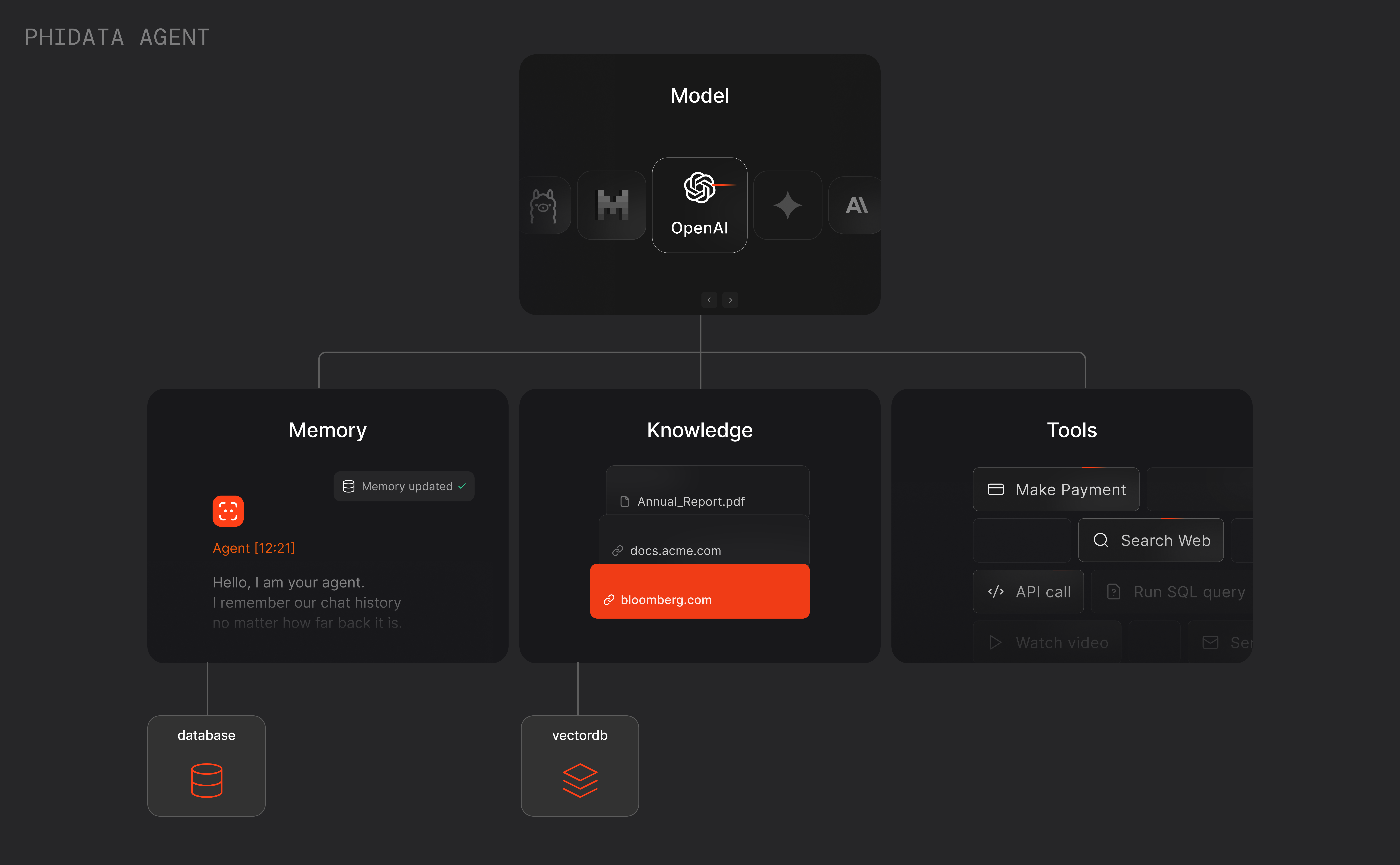
> **Agents are autonomous programs that achieve tasks using language models.**
Engineers use phidata to build agents with memory, knowledge, tools and reasoning.
 ## Example: Research Agent
Let's create a research agent that can search the web, read the top links and write a report for us. We **"prompt"** the agent using `description` and `instructions`.
Create a file `research_agent.py`
```python research_agent.py theme={null}
from phi.agent import Agent
from phi.model.openai import OpenAIChat
from phi.tools.duckduckgo import DuckDuckGo
from phi.tools.newspaper4k import Newspaper4k
agent = Agent(
model=OpenAIChat(id="gpt-4o"),
tools=[DuckDuckGo(), Newspaper4k()],
description="You are a senior NYT researcher writing an article on a topic.",
instructions=[
"For a given topic, search for the top 5 links.",
"Then read each URL and extract the article text, if a URL isn't available, ignore it.",
"Analyse and prepare an NYT worthy article based on the information.",
],
markdown=True,
show_tool_calls=True,
add_datetime_to_instructions=True,
# debug_mode=True,
)
agent.print_response("Simulation theory", stream=True)
```
Install libraries
```shell theme={null}
pip install phidata openai duckduckgo-search newspaper4k lxml_html_clean
```
Run the agent
```shell theme={null}
python research_agent.py
```
The description and instructions are converted to the system prompt and the input (e.g. `Simulation theory`) is passed as the user prompt.
Use `debug_mode=True` to view the raw logs behind the scenes.
## Capturing the Agent's response in a variable
While `Agent.print_response()` is useful for quick experiments, we typically want to capture the agent's response in a variable to either pass to the frontend, another agent or use in our application. The `Agent.run()` function returns the response as a `RunResponse` object.
```python theme={null}
from phi.agent import Agent, RunResponse
from phi.utils.pprint import pprint_run_response
agent = Agent(...)
# Run agent and return the response as a variable
response: RunResponse = agent.run("Simulation theory")
# Print the response in markdown format
pprint_run_response(response, markdown=True)
```
By default `stream=False`, set `stream=True` to return a stream of `RunResponse` objects.
```python theme={null}
from typing import Iterator
# Run agent and return the response as a stream
response_stream: Iterator[RunResponse] = agent.run("Simulation theory", stream=True)
# Print the response stream in markdown format
pprint_run_response(response_stream, markdown=True, show_time=True)
```
## RunResponse
The `Agent.run()` function returns either a `RunResponse` object or an `Iterator[RunResponse]` when `stream=True`.
### RunResponse Attributes
| Attribute | Type | Default | Description |
| -------------- | ---------------------- | ----------------------------- | -------------------------------------------- |
| `content` | `Any` | `None` | Content of the response. |
| `content_type` | `str` | `"str"` | Specifies the data type of the content. |
| `context` | `List[MessageContext]` | `None` | The context added to the response for RAG. |
| `event` | `str` | `RunEvent.run_response.value` | Event type of the response. |
| `event_data` | `Dict[str, Any]` | `None` | Data associated with the event. |
| `messages` | `List[Message]` | `None` | A list of messages included in the response. |
| `metrics` | `Dict[str, Any]` | `None` | Usage metrics of the run. |
| `model` | `Model` | `OpenAIChat` | OpenAI model is used to run by default. |
| `run_id` | `str` | `None` | Run Id. |
| `agent_id` | `str` | `None` | Agent Id for the run. |
| `session_id` | `str` | `None` | Session Id for the run. |
| `tools` | `List[Dict[str, Any]]` | `None` | List of tools provided to the model. |
| `created_at` | `int` | - | Unix timestamp of the response creation. |
## Example: Research Agent
Let's create a research agent that can search the web, read the top links and write a report for us. We **"prompt"** the agent using `description` and `instructions`.
Create a file `research_agent.py`
```python research_agent.py theme={null}
from phi.agent import Agent
from phi.model.openai import OpenAIChat
from phi.tools.duckduckgo import DuckDuckGo
from phi.tools.newspaper4k import Newspaper4k
agent = Agent(
model=OpenAIChat(id="gpt-4o"),
tools=[DuckDuckGo(), Newspaper4k()],
description="You are a senior NYT researcher writing an article on a topic.",
instructions=[
"For a given topic, search for the top 5 links.",
"Then read each URL and extract the article text, if a URL isn't available, ignore it.",
"Analyse and prepare an NYT worthy article based on the information.",
],
markdown=True,
show_tool_calls=True,
add_datetime_to_instructions=True,
# debug_mode=True,
)
agent.print_response("Simulation theory", stream=True)
```
Install libraries
```shell theme={null}
pip install phidata openai duckduckgo-search newspaper4k lxml_html_clean
```
Run the agent
```shell theme={null}
python research_agent.py
```
The description and instructions are converted to the system prompt and the input (e.g. `Simulation theory`) is passed as the user prompt.
Use `debug_mode=True` to view the raw logs behind the scenes.
## Capturing the Agent's response in a variable
While `Agent.print_response()` is useful for quick experiments, we typically want to capture the agent's response in a variable to either pass to the frontend, another agent or use in our application. The `Agent.run()` function returns the response as a `RunResponse` object.
```python theme={null}
from phi.agent import Agent, RunResponse
from phi.utils.pprint import pprint_run_response
agent = Agent(...)
# Run agent and return the response as a variable
response: RunResponse = agent.run("Simulation theory")
# Print the response in markdown format
pprint_run_response(response, markdown=True)
```
By default `stream=False`, set `stream=True` to return a stream of `RunResponse` objects.
```python theme={null}
from typing import Iterator
# Run agent and return the response as a stream
response_stream: Iterator[RunResponse] = agent.run("Simulation theory", stream=True)
# Print the response stream in markdown format
pprint_run_response(response_stream, markdown=True, show_time=True)
```
## RunResponse
The `Agent.run()` function returns either a `RunResponse` object or an `Iterator[RunResponse]` when `stream=True`.
### RunResponse Attributes
| Attribute | Type | Default | Description |
| -------------- | ---------------------- | ----------------------------- | -------------------------------------------- |
| `content` | `Any` | `None` | Content of the response. |
| `content_type` | `str` | `"str"` | Specifies the data type of the content. |
| `context` | `List[MessageContext]` | `None` | The context added to the response for RAG. |
| `event` | `str` | `RunEvent.run_response.value` | Event type of the response. |
| `event_data` | `Dict[str, Any]` | `None` | Data associated with the event. |
| `messages` | `List[Message]` | `None` | A list of messages included in the response. |
| `metrics` | `Dict[str, Any]` | `None` | Usage metrics of the run. |
| `model` | `Model` | `OpenAIChat` | OpenAI model is used to run by default. |
| `run_id` | `str` | `None` | Run Id. |
| `agent_id` | `str` | `None` | Agent Id for the run. |
| `session_id` | `str` | `None` | Session Id for the run. |
| `tools` | `List[Dict[str, Any]]` | `None` | List of tools provided to the model. |
| `created_at` | `int` | - | Unix timestamp of the response creation. |